UGC ads for mobile apps: a UA brief and creative scorecard
Build mobile app UGC ads around truthful product demos, clear briefs, and a scorecard that follows installs through activation and first payments.

UGC ads for mobile apps combine human footage with a clear demonstration of the app and a relevant next step. For a user acquisition team, the job is not simply to make an ad look native. It is to attract people who understand the product and are likely to use it after installing.
My starting point: write the user problem and the action you want after the install before you buy another clip. Then choose a reaction, a demonstration, and a message that belong together. A cheap install is not automatically a useful customer.
This guide is a practical brief and review framework for teams running Meta and TikTok app ads. It is not a claim that UGC always beats other formats or that a particular reaction will lower your cost per install.
What belongs in a mobile app UGC ad?
A useful app ad needs three ingredients: a reason to pay attention, product evidence, and a clear next step. Human footage can supply the first ingredient. It cannot replace the other two.
For example, a study app could open on someone frustrated by scattered notes, show the actual process of turning notes into a practice quiz, and invite viewers to try that workflow. That is an illustrative concept, not a DansUGC client result. The feature must exist in the advertised app before the team uses the concept.
There are several ways to source the human part:
- Ready-made reaction footage: useful when you need a facial expression or everyday context around your own app recording. The person in the clip has not necessarily used your app.
- A commissioned creator demonstration: useful when the person needs to interact with the product, deliver a specific script, or demonstrate a real experience.
- A genuine customer account: useful when a customer can describe their own experience and the team has permission to use it. Do not manufacture a testimonial from unrelated stock footage.
These are different inputs, not interchangeable levels of quality. Our UGC clips vs custom UGC guide explains the buying decision in more detail.
Start the brief with the user, not the reaction
“Send us ten shocked faces” leaves the editor to invent the strategy. A better brief explains what the viewer is trying to do and why the app is a plausible solution.
Use this compact brief for each concept:
- Audience situation: what is happening when this person needs the app?
- Problem: which specific friction are we addressing?
- Promise: what can the current product actually help them do?
- Proof: which real screen or workflow will demonstrate that promise?
- Human footage: which expression or situation adds context without implying an invented personal experience?
- Next step: what should the viewer do, and what will they encounter after the click?
- Measurement: which post-install action would show that we attracted the right person?
- Constraints: approved claims, current offer, usage permission, required formats, and the review owner.
Here is a filled example for an imaginary study app. The audience is students preparing for an exam with messy notes. The problem is spending too much time deciding what to revise. The product proof is a real screen recording of creating and completing a practice quiz. The opening footage shows concentration rather than a generic exaggerated reaction. The next step is to try a practice quiz. The activation event is completing that first quiz, not merely opening the app.
The concept only makes sense if the product and onboarding deliver that experience. If they do not, change the promise before changing the creator.
Choose footage that leaves room for product evidence
Preview clips next to the screen recording, not in isolation. A striking reaction can still be a bad fit if its background, movement, or framing makes the app difficult to understand.
Check the following before licensing:
- Does the expression make sense beside this exact feature?
- Is there enough usable space for captions and the product demonstration?
- Can the edit reach the feature quickly without an abrupt or confusing transition?
- Is the action understandable on a small phone screen?
- Will the crop preserve the important part of the face and the product?
- Does the permission cover the intended commercial use, channel, and period?
DansUGC's real-human clip library lets you preview footage before choosing assets. Treat the library as a source of footage for your edit, not as proof that the creator endorses your app. Check the current license and offer when you purchase; preview access is not permission to publish a clip.
For a practical sequence that combines a reaction with a product demonstration, see our app reaction-ad storyboard.
Build a scorecard before the ad goes live
A preflight scorecard is a quality check, not a prediction of performance. Give each item a clear pass or a specific revision. Avoid turning subjective scores into a claim that an ad is guaranteed to win.
Message match: the opening, demonstration, call to action, and destination describe the same product experience. A promise about an instant result should not lead to an unrelated offer.
Product truth: the recording uses the current product. Remove invented dashboards, misleading progress states, and unsupported outcome claims. Hide private user information in demonstrations.
Human context: the actor's expression supports the story without turning a staged reaction into a fake customer review. Where a real experience is claimed, the team needs evidence for it.
Phone readability: preview the exported file at phone size. Check captions, app labels, contrast, and placement around platform interface elements. Review sound and the silent viewing experience separately.
Delivery completeness: the editor hands over the agreed exports, source identifiers, usage records, and version names. The person uploading the ad should not have to guess which edit was approved.
TikTok's creative best-practice guidance recommends vertical creative, attention to interface safe zones, an early hook, a clear proposition, and a call to action. Treat that as a starting point for your own testing, not evidence that any single format will succeed.
Measure beyond cost per install
Cost per install, or CPI, is ad spend divided by attributed installs. It is useful, but it does not tell you whether those people reached value in the app or became paying customers.
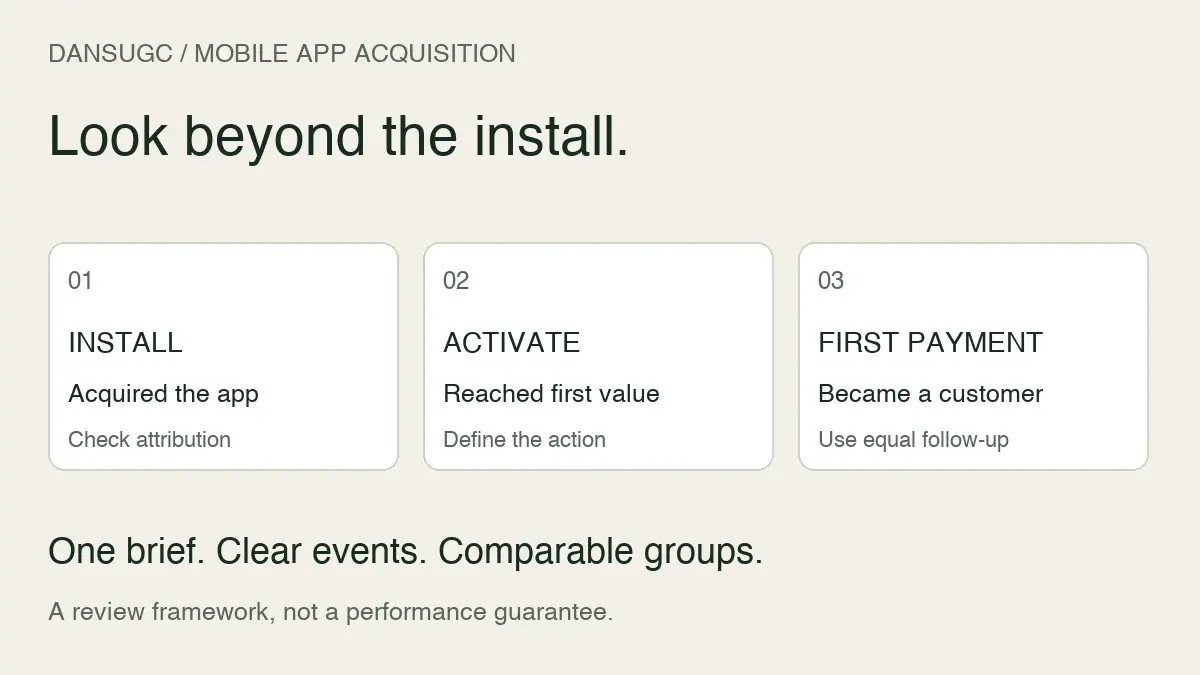
Choose a small set of downstream measures that fits your business:
- Install: did someone acquire the app according to the measurement system you are using?
- Activation: did they complete the first meaningful product action, such as finishing a quiz or creating a project?
- First payment: did they become a paying customer, rather than just begin a trial or open a paywall?
- Continued use or retention: did they return and use the product within the period you chose?
Define those events precisely with your product and analytics team. Do not compare a completed paid subscription in one report with a free trial in another and label both purchases.
Keep the source, attribution rules, geography, operating system, and observation period visible beside the numbers. A new group of users has had less time to subscribe than an older group. Compare groups with the same opportunity to complete the action, and mark incomplete data as incomplete.
An illustrative calculation shows why this matters. Suppose two concepts each receive $300 in ad spend. Concept A records 150 attributed installs and three first payments. Concept B records 100 installs and five first payments. A has the lower CPI: $2 versus $3. B has the lower ad cost per first payment: $60 versus $100. These are invented numbers to explain the arithmetic, not a benchmark or a campaign result. Such small counts are not enough on their own to declare a reliable winner.
For planning, also track the cost of sourcing footage, editing, revisions, and production management. Keep that production cost separate from platform media metrics so the team knows which number it is discussing. Our app-studio UGC cost guide covers that budget worksheet.
Record the decision, not just the winning file
At review time, write down the concept, intended audience, version, spend, relevant outcomes, reporting window, and next decision. Add the reason for that decision in plain language.
If an ad attracts clicks but people do not complete the first useful action, investigate the promise, destination, onboarding, and measurement before concluding that the face is wrong. If the export is unreadable, fix the export. If the product demonstration does not support the opening claim, rewrite the concept.
Change variables deliberately enough that the next review teaches you something. Replacing the offer, audience, footage, and onboarding simultaneously makes it harder to know what mattered. This guide does not prescribe a universal test budget or minimum number of installs; those depend on your baseline, event rate, and the decision you need to make.
When a once-useful concept weakens, consult our UGC creative-refresh workflow. That guide covers preparing the next assets. This scorecard covers whether the current creative is attracting the right app users.
FAQ: UGC ads for mobile apps
Can ready-made UGC clips work for mobile app ads?
They can be used as part of an app ad when their context and usage rights fit. Combine them with your own accurate product demonstration and a relevant next step. A ready-made reaction is not a finished acquisition strategy or a verified customer testimonial.
Should we optimize the creative for installs or subscriptions?
Review both the acquisition step and the business outcome. An install can be a useful intermediate signal, but a subscription business also needs to understand first payments and retention. Your bidding setup is a separate decision that depends on reliable measurement and available event data.
Does a new reaction fix creative fatigue?
Not necessarily. It creates another visual option. It does not repair an irrelevant promise, a broken onboarding flow, or an offer the audience does not want. Diagnose the problem before increasing production.
What should we prepare before buying footage?
Prepare the audience problem, truthful promise, current app recording, intended channels, usage requirements, and the action you will measure after the install. Then preview the human footage against that brief.
Build the next app creative around a real user problem
Start with one concrete use case, not a folder of disconnected reactions. Show the app doing the useful thing. Make the next step clear, and review the users it brings in rather than celebrating cheap installs alone.
When you know which expression and context your concept needs, preview DansUGC footage and build the edit around your own product evidence.
Ready to get UGC videos for your brand?
Real human creators, 48-hour delivery, 12-month commercial license. Starting at $9/video.