UGC video examples: three real clips, annotated
Compare three real UGC reaction previews with frame-by-frame observations, verified preview durations, editing ideas, and a practical clip-selection checklist.

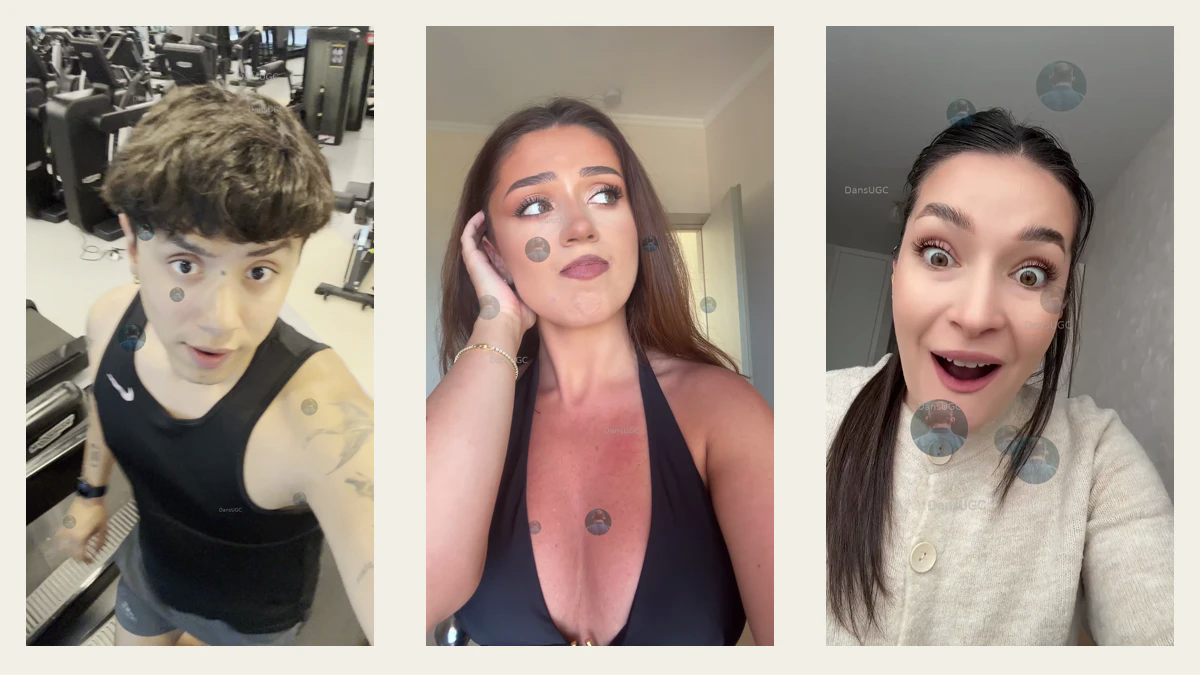
A useful UGC video example shows you what the footage contains, where it could fit in an edit, and what it cannot prove. Below are three real DansUGC preview clips: a gym reaction, a quieter indoor portrait, and an expressive front-facing reaction. Use them to compare framing and editing possibilities—not as evidence that a particular clip will go viral or sell your product.
Updated September 22, 2026. The contact sheet above uses actual frames from the linked watermarked previews. Left to right: Carlos at approximately one second, Eliza at seven seconds, and Lilia at two seconds. These are editorial examples, not a campaign-results study.
What makes these UGC examples useful?
I would start with the job the shot needs to do. Do you need a reaction before a product reveal, a pause between two ideas, or a person on screen while you explain a problem? Those are different editing decisions. “Looks good” is not a brief.
For each example, separate three things: the visible footage, a possible use in your edit, and the evidence you still need. A facial expression is footage. A suggested sequence is an editing idea. A claim that someone used your product requires its own support.
If you are still choosing the format, the UGC clips guide explains how reusable footage fits into a wider content workflow.
Example 1: Carlos — a gym setting and an open-mouth reaction
In the sampled frame, Carlos is filmed from an elevated angle in a gym setting, with treadmill equipment visible. He is looking upward with wide eyes and an open mouth. His dark top and the equipment provide a very different visual context from the two indoor portraits below.
Possible editing job: a short visual interruption before showing a fitness-related problem, demonstration, or reveal. That is a proposed use, not a statement about what Carlos is reacting to in the source footage.
Before choosing it, check whether the gym setting belongs in your story. A strong expression does not compensate for an unrelated environment. Also check the crop at the size people will actually see: the face, body, and equipment compete for space in this vertical composition.
The linked preview file measured approximately 5.37 seconds when checked for this update. That measurement describes this preview, not a promise about a purchased master file or available variations.
Watch Carlos’s watermarked preview.
Do not imply: that Carlos tested your fitness product, achieved a particular result, or supplied a testimonial. None of those claims follows from this reaction frame.
Example 2: Eliza — an off-camera look with a hand near her hair
The sampled frame shows Eliza indoors, looking off-camera with one hand near her hair or ear. The selected moment is quieter than the other two frames. It gives you an example of a person on screen without relying on an exaggerated open-mouth expression.
Possible editing job: a thinking pause between a problem statement and the next step. For example, a caption could pose a question while the following shot shows your own product interface. Keep that distinction clear: the product demonstration is your evidence, while the portrait is illustrative footage.
Before choosing it, watch the full preview rather than deciding from this still. Check the timing around the moment you want, where her gaze leads, and whether your text would cover her hand or face. Avoid assigning a precise emotion or story solely from the filename.
The linked preview measured 10 seconds in this check. Its filename includes “13s”; the downloadable preview itself is the basis for the measurement here. Confirm the actual deliverable before planning a sequence around a longer duration.
Watch Eliza’s watermarked preview.
Do not imply: that the person is worried about your audience’s specific problem or has used the app you place beside the footage. Those would be additional claims, not observations from the frame.
Example 3: Lilia — a front-facing, expressive portrait
In the sampled frame, Lilia faces the camera with wide eyes and an open-mouth smile. She wears a light cardigan against an indoor background. Compared with Carlos’s gym frame, this example gives you a more direct portrait without the same equipment-heavy setting.
Possible editing job: an expressive cut after a reveal or a contrasting beat between two pieces of information. For a product video, the preceding shot should make the reveal understandable without asking the reaction to explain everything.
Before choosing it, test your intended caption placement. An expression is less useful if a headline covers the eyes or mouth. Check the start and end of the exact segment you would use, too: a selected still cannot show whether the cut into or out of that moment feels natural.
The linked preview measured 5 seconds, although its filename includes “12s.” As with the other examples, this is a preview-file measurement, not the duration of every version that might be available.
Watch Lilia’s watermarked preview.
Do not imply: that an expressive reaction is a verified customer review or a guaranteed engagement improvement. A reusable shot and an authentic product testimonial serve different purposes.
How to shortlist a clip without inventing a performance score
Use a simple keep, adapt, or reject decision for the edit in front of you. A number such as “9 out of 10” is not useful unless the scoring method and evidence are clear.
- Scene fit: does the setting belong in the story, or will you spend the opening explaining why it is there?
- Visible action: can you describe what happens without relying on a filename or an imagined backstory?
- Crop and text space: can the face, movement, and essential text remain readable together?
- Sequence fit: is there a clean entry and exit around the moment you need?
- Claim fit: could the finished edit imply product use, endorsement, or results that you cannot support?
- Deliverable fit: have you checked the actual file, permitted use, and current offer rather than assuming the preview answers everything?
Keep a shot when it fits the job as supplied. Adapt it when a crop or shorter segment solves a specific problem. Reject it when the underlying context or claim is wrong. You do not need to force all three examples into one video.
For a repeatable request to creators or editors, use the UGC reaction briefing checklist.
A practical sequence to try
Here is a hypothetical editing structure—not a tested campaign or a promised result. Start with a clear problem statement, show a real demonstration of the solution, then use a brief reaction as an illustrative closing beat. End with the actual next step you want the viewer to take.
For a software product, the demonstration could be your own screen recording of a real workflow. The reaction should not be presented as a customer’s review of that workflow unless that is genuinely what it is. If the concept needs a creator to hold your product, say specific lines, or demonstrate its use, reusable reaction footage may not be enough. Compare existing clips with custom UGC before choosing the production route.
Change one meaningful creative decision at a time when reviewing your own edits. Record which clip and segment you used, the caption, the surrounding shots, and the intended action. Without that record, it is difficult to tell what you actually changed. These examples come with no campaign-level performance evidence, so there is no winner to declare here.
Preview first, then check the current offer
The links above open watermarked preview files. They let you inspect these examples; they do not by themselves establish the purchase terms, current availability, file package, or suitability for your project.
Browse the DansUGC B-roll library to compare the current footage and offer. Before committing to a particular concept, confirm that the clip you want is available, that the supplied version works in your edit, and that the applicable usage terms cover your intended placement. Do not assume footage is exclusive or that a visible person endorses your brand.
Frequently asked questions
Are these examples proven high-performing ads?
No. They are real preview clips with editorial observations and proposed editing uses. This page does not provide campaign results, controlled tests, or evidence that one example will outperform another.
Why are the durations different from some filenames?
The durations here were measured from the linked preview files on September 22, 2026. Eliza’s current preview is ten seconds and Lilia’s is five seconds, despite longer durations in their filenames. Check the delivered file rather than using a filename as a specification.
Can a reaction clip replace a testimonial?
Not by itself. A reaction clip shows a person’s expression or movement. It does not establish that they bought, used, or recommend the product in your finished video. Use actual supported customer evidence when the concept calls for a testimonial.
Why show a contact sheet instead of autoplay videos?
The contact sheet gives you an immediate, static view of all three examples. Open the linked previews to inspect motion and timing. A still is useful for comparing composition, but it cannot replace watching the segment you plan to edit.
Editorial note: this update replaces the earlier numerical clip ratings with observable selection criteria, corrects the linked preview durations, and separates editing suggestions from performance claims. The frames are taken from the existing DansUGC previews; no customer results or expressions were generated for this article.
Ready to get UGC videos for your brand?
Real human creators, 48-hour delivery, full commercial rights. Starting at $9/video.