How many UGC creatives do you need per month?
Plan monthly UGC output from publishing needs, reusable edits, missing shots, and team capacity. Includes a worked example and a copyable worksheet.

The number of UGC creatives you need per month comes from your publishing slots, usable inventory, planned tests, and production capacity. Count the finished videos you can actually publish or evaluate. Subtract the approved videos you can reuse. Then plan only the missing edits and source shots. There is no universal monthly quota that makes ads profitable or organic posts grow.
Buying more clips does not fix an editing queue nobody can clear.
This guide gives you a planning worksheet, not a performance benchmark. The worked numbers below are hypothetical. Use your own calendar, production records, and results before committing to a quantity.
First, decide what you are counting
A raw clip, a creative concept, and a finished video are different units. Mixing them makes a production plan look bigger than it is.
- A source clip is a recorded shot: a reaction, product demonstration, or spoken line.
- A concept is the message or idea you want to communicate.
- A finished creative is an approved edit ready for its intended placement.
- A variant changes something in that edit, such as the opening or caption. It may reuse the same source footage.
One source clip can appear in several edits. One edit can require several source clips. For this worksheet, track three exports in different sizes as three format deliverables, even if they share one concept.
Use the UGC clips guide to define the source material. Put finished creatives and raw footage in separate columns in your monthly plan.
Build the plan from scheduled uses
Start with what needs to go live and why. For every planned use, record the channel, date, message, required format, destination, and owner. Include a launch or product update only when it actually needs new material.
For organic content, count the publishing slots you intend to fill. Do not assume that every slot needs a new shoot. An existing approved video may still answer the question, although a new channel can require a different edit or caption.
For paid creative, list the questions you can realistically evaluate. A new hook, demonstration, or objection is a question. A folder of variations without a test plan is just inventory. The appropriate testing quantity depends on your budget, expected traffic, measurement, and decision criteria; a fixed spend or number of days does not prove that every creative has had a fair test.
Keep a shared calendar when the same asset serves both uses. Otherwise, two teams may commission the same input independently.
Subtract usable inventory before ordering
Review what you already have. An asset counts as usable only if it still fits the message, shows the current product, has suitable framing and audio, and can be used under the applicable permissions. Mark anything uncertain for review rather than treating it as ready.
Use this planning equation for finished output:
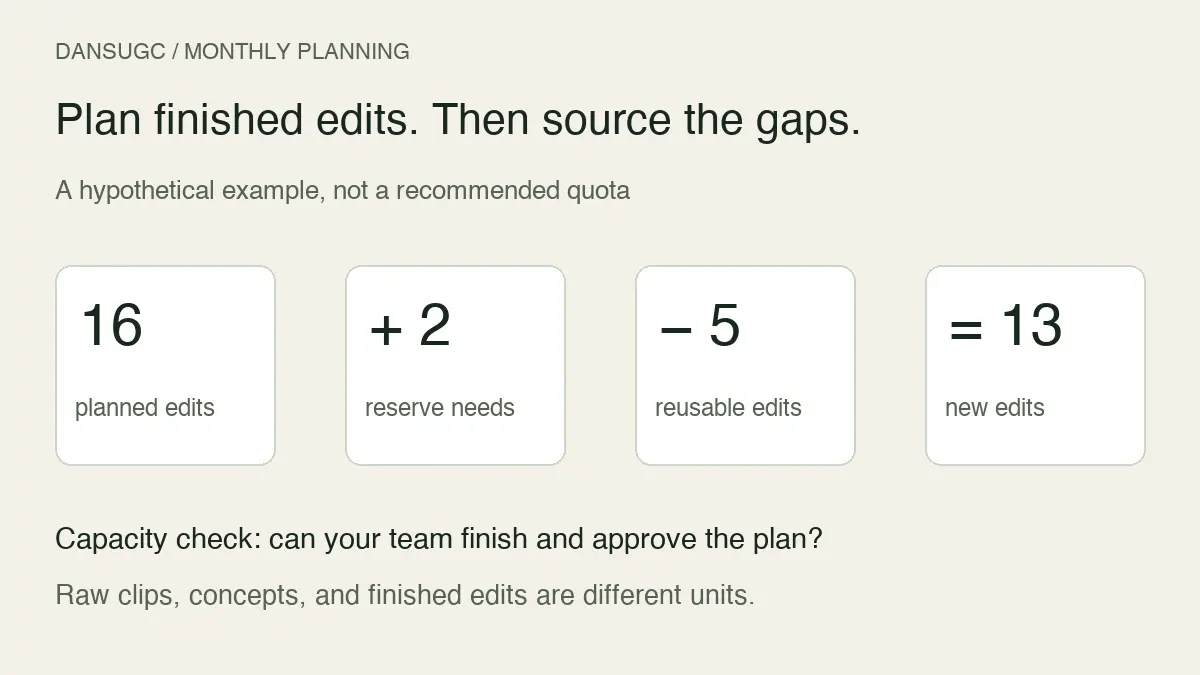
New finished creatives needed = planned uses requiring distinct edits + explicit reserve needs − approved reusable edits assigned to those uses.
Keep the result at zero or above. The equation is a way to organize requirements, not a formula for reach or return on ad spend. Do not subtract one reusable edit twice unless the plan genuinely allows that same edit to cover both slots.
Reserve needs not already counted should have a reason: an upcoming product change, an asset whose permission expires, or a delayed launch that needs a fallback. Do not add a standard percentage simply because it sounds professional.
A worked monthly example
Imagine a team has 12 organic slots that need distinct edits and four additional creative-test edits. It can assign five approved existing edits to those uses. It also needs two backup edits for a scheduled launch.
The plan is 12 + 4 + 2 − 5 = 13 new finished edits.
That does not mean ordering 13 clips or hiring 13 creators. The next step is a shot list for those edits. Perhaps several edits can use the same approved reaction while each demonstration needs a different product screen. The footage order comes from those gaps, not the number 13.
Now check capacity. Suppose the team has 18 editing hours available and its own planning estimate is 1.5 hours per approved edit, including revisions. That supports at most 12 edits before allowing for delays or other bottlenecks, so the plan is at least one edit over capacity. These are example assumptions, not DansUGC delivery estimates.
The useful response is to move a lower-priority edit, simplify its scope, or agree more capacity. Ordering extra footage does not create the missing editing time.
Convert the edit plan into a missing-shot list
For every new edit, identify the source IDs you already have and the exact shots still missing. Combine duplicate requirements only when the same footage really fits both messages.
Existing footage can fill a suitable recorded reaction or supporting moment. Custom filming is appropriate when the shot must show your product, script, or specific action. DansUGC provides separate entry points for the B-roll library and custom orders; check current availability and scope before committing.
The clips versus custom UGC comparison helps with that sourcing decision. This worksheet estimates the work required; the comparison helps decide how to source it.
Your final brief should say how many source assets, finished edits, and variants are required. Name the reviewer and define acceptance. Do not ask for “20 videos” when half of them are raw takes and the other half are finished exports.
Check the slowest stage, not just filming capacity
Estimate the work at each stage: briefing, sourcing or filming, raw review, editing, approval, and publishing. The monthly plan needs to fit all of them. Overall output may still be limited if review capacity is the bottleneck, even when creators are available.
Base estimates on your own completed work where possible. Include time spent on revisions and rejected material. If you have no records, run a small pilot and label the estimate provisional. Avoid treating one unusually easy edit as the standard for every format.
If you use a historical acceptance rate to estimate raw input, keep that separate from finished-edit capacity. An acceptance rate from silent reaction clips may not describe scripted product demonstrations. Small samples are especially uncertain; agree how missing shots will be handled instead of promising a precise usable output.
The content-factory workflow shows how to record these handoffs. The monthly quantity should be an output of that process, not a target imposed on it.
Copy this monthly planning worksheet
- Planned use: channel, message, placement, date, and destination.
- Output required: concept, finished edit, format variant, or raw source clip.
- Existing material: source IDs, approved version, and permission record.
- Missing material: exact shot, action, words, or product screen.
- Work remaining: briefing, filming, editing, review, and publishing time.
- Owner and approver: who moves the asset forward and who accepts it.
- Decision after publication: what you will measure and when you will review it.
Every row should end with an approved output or a clearly named blocker. “More content” is not a usable brief.
When should you change the number?
Increase the plan when there are specific uncovered uses and enough capacity to finish and evaluate the work. Reduce or reschedule it when approved assets sit unused, revisions consume the available hours, or there is not enough information to interpret the tests already running.
A performance decline alone does not prove a footage shortage. Check whether the message, offer, destination, audience, or measurement changed. More videos can reproduce the same unresolved problem.
Review the plan at an interval your team can act on. Record planned, approved, published, and evaluated output separately. This makes it clear whether you need more source material or simply need to finish the work already commissioned.
Common questions
Is there a minimum number of UGC videos per month?
Not a universal one. Start with the specific uses you can fund, complete, publish, and assess. A suggested quantity without those inputs is not a reliable requirement for your business.
Does a larger ad budget automatically mean more UGC?
It may create room for more testing, but it does not determine a fixed footage order. Testing goals, traffic, existing assets, production capacity, and measurement still matter.
Can the same clip support several posts?
Yes, if the permitted use and context fit. Count each required finished edit separately, but avoid ordering a duplicate source shot when the one you have already meets the brief.
What should I buy first?
Complete the worksheet and identify the missing shot. Inspect the library when an existing moment can do the job. Commission custom footage when the required action needs to be filmed. Start with the inputs for one complete, reviewable batch.
Updated September 14, 2026: replaced unsupported monthly volume tiers, creative-lifespan claims, and fixed ad-testing spend rules with a capacity-based worksheet and an explicitly hypothetical example. No customer results or platform performance guarantees are implied.
Ready to get UGC videos for your brand?
Real human creators, 48-hour delivery, full commercial rights. Starting at $9/video.